
There are four status tags available to use on the Sprift platform:
- Active
- Prospect
- Agreed
- Archived
Use the grey arrow to the right hand side of the thumbnail to open the dropdown
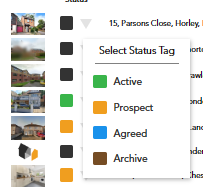
From here you can select the status of that address.
When you login all tags are displayed by default.
You can filter your properties using the tabs above the search bar

Watch our step by step video tutorial
If you have any questions or run into any issues, don't hesitate to reach out to our support team at customer.success@sprift.com or 0207 096 0847.
We're always here to help you get the most out of the platform.