
The 'Do not mail' flag can be found and applied within the 'on market' section, to the right hand side of the address line.
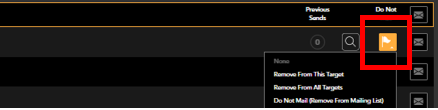
There are three options to choose from when removing addresses from your mail outs:
- Remove from this target - The address will be removed from the current target it is shown in i.e. Added. It will then re-appear once it meets the criteria for the next target i.e. 1 Week.The address will show in the list with the flag highlighted orange, the option to add this address to your basket will be greyed out.
- Remove from all targets - The address will be removed from the current target and all subsequent weeks or status changes.
The address will show in the list with the flag highlighted orange, the option to add this address to your basket will be greyed out. - Do not mail (remove from mailing list) - The address will be removed from view in on market and supressed when creating any mail outs using area search or Auto Mail.
In order to re-instate any address flagged as 'Do not mail (remove from mailing list)' you will need to contact customer.success@sprift.com